The Ultimate Guide to Building an AI Team in 2027
By Gaurav Gurbaxani, Founder of AiExpert. Updated 2026-11-28. About 25 minutes to read.
Key takeaways
- An AI team is a group of AI workers, each with one job, that share one memory of your business, connect to your tools and send their work to a person for approval.
- Start with work that repeats every week, is quick to check and is cheap to get wrong: follow-ups, content and research.
- Write your business facts down once (offer, customer, voice, proof, rules) so every AI worker reads the same truth.
- Hire a chief of staff first, plus the one role that clears your biggest bottleneck; add roles only when the first ones save you time.
- Connect tools in order of trust: read only, then drafts, then send with approval. Nothing reaches a customer without a yes.
- Roll it out in 30 days with one gate a week, and measure one number per role.
Read the video transcript
0:00 In 2027, the smartest small businesses won't hire more people. They'll build an AI team. Here's how, in two minutes.
0:09 An AI team is a group of AI workers, each with one job. They share one memory of your business, connect to your tools, and answer to you.
0:18 Every AI team runs on the same loop. You give a brief. Your Experts read your business facts and your apps, do the work, and the draft waits in one queue for your approval.
0:30 Step one: map the work. Hand over tasks that repeat every week, are quick to check, and are cheap to get wrong.
0:38 Step two: give the team a business brain. Your offer, your customer, your voice, your proof and your rules, written down once, so every worker reads the same facts.
0:51 Step three: hire the roles. One clear job each. Start with a chief of staff, plus the one role that clears your biggest bottleneck.
1:00 Step four: put them to work. Set up your CRM, send email campaigns, answer the phone, plan social posts, rank in AI search, and chase invoices.
1:11 Step five: connect your tools in order of trust. Read only first, then drafts, then send with approval.
1:19 Step six: set the rules. Nothing reaches a customer until a person says yes.
1:26 Step seven: run it like a team. A morning brief, a weekly rhythm, and one number per role.
1:33 The whole team costs less each month than a few hours of freelance help.
1:38 Roll it out in thirty days, one gate a week, and don't move on until you pass it.
1:44 Read the full guide, with twenty-five step-by-step jobs, and get the four free checklists, at aiexpert dot com slash guides.
In 2027, the smartest small businesses won't have bigger payrolls. They'll have an AI team: AI specialists who set up the CRM, send the emails, write the posts, answer the phone, chase invoices and report the numbers, while the owner approves what goes out.
This is the complete guide to building one. It's written for owners, solo founders, coaches and agencies who want results, not another AI tool to babysit. Read it in order, or jump to the job you want off your plate first.
What you'll learn
- The method: how to map your work, give AI your business brain, and hire the right roles
- The jobs: more than 25 "how to do X using AI" playbooks, from setting up your CRM to ranking in AI search
- The rules: how to connect your tools safely and keep a human in charge of everything that leaves the building
- The numbers: what an AI team costs in 2027 and how to measure whether it's working
Table of contents
- What is an AI team?
- How an AI team works
- Benefits of an AI team
- Chapter 1: Map the work before you hire
- Chapter 2: Give your team a business brain
- Chapter 3: Hire your AI team
- Chapter 4: Put your AI team to work (25+ jobs)
- Chapter 5: Connect your tools
- Chapter 6: Set the rules
- Chapter 7: Run it like a team
- What an AI team costs in 2027
- AI teams for agencies
- Seven mistakes to avoid
- Your 30-day rollout plan
- The whole guide on one page (infographic)
- Frequently asked questions
No coding needed. If you can brief a freelancer, you can run an AI team.
What is an AI team?
An AI team is a group of AI workers, each with one defined job, that share a single memory of your business, connect to your everyday tools, and send their work to a human for approval before anything reaches a customer.
Each worker is an AI agent: software built on a large language model that can plan, use tools and finish a task, not just answer a question. Put several agents together, give them shared context and a manager, and they start behaving like staff.
Four things separate an AI team from a chatbot or a pile of AI apps:
| Chatbot | Tool stack | AI team | |
|---|---|---|---|
| Knows your business | Only what you paste in | Each tool knows a little | One shared set of facts every worker reads |
| Has a job | Answers questions | Does one task | Owns an outcome: leads, content, cash |
| Works without you | No | Rarely | Runs scheduled and triggered jobs |
| Safety | Nothing leaves the chat | Often posts or sends directly | Drafts first; you approve what goes out |
The test is simple. If you have to re-explain your business every time you open the tool, you have a chatbot. If it already knows your offer, your customers and your voice, and it shows up on Monday with work done, you have a team.
How an AI team works
Every AI team runs on the same loop: you give a brief or set a schedule, a chief of staff hands the job to the right specialist, the specialist reads your business facts and your tools, and the finished draft waits for your approval.
The approval queue is what makes this safe to run every day: the AI does the work, and you stay the one who decides what goes out.
Benefits of an AI team
An AI team gives a small business the output of a department without the payroll. The five benefits owners notice first:
- Speed. Leads get a drafted reply in minutes, not days. Speed to follow-up is often the difference between a sale and silence.
- Consistency. The newsletter goes out every week. The posts go out every day. Nothing depends on whether you had a good Tuesday.
- Always on. Calls get answered after hours, reviews get a reply over the weekend, and your morning brief is ready before you are.
- Lower cost. A full AI team costs less per month than a few hours of freelance work. See what an AI team costs.
- Your time back. You move from doing the work to approving it, which is where an owner's time is worth the most.
The catch: an AI team is only as good as the brief and the business facts you give it. Chapters 1 to 3 fix that.
Chapter 1: Map the work before you hire
Start with your week, not with the AI. For five working days, note every task that takes more than 15 minutes. Then sort each one with three questions:
- Is it repeatable? Weekly reports, follow-up emails, social posts and lead research come back every week. One-off strategy calls don't.
- Can I judge the result in under two minutes? If you can review a draft quickly, it's a great fit. If checking it takes as long as doing it, wait.
- What happens if it's wrong? A weak blog draft costs nothing. A wrong invoice or a rude reply to a client costs a lot. Start low-risk.
The sweet spot is work that is repeatable, quick to review and cheap to get wrong. For most small businesses, the first three jobs to hand over are:
- Follow-ups: drafting replies to leads and past customers who went quiet
- Content: turning one idea a week into a post, an email and a short video script
- Research: checking competitors, prospects and reviews, then summarising what changed
Stuck for ideas? Browse the AI task library: more than 70 jobs small businesses hand to AI, each with a ready-made brief, such as find out why my homepage isn't converting. Or start from a proven playbook: get your first 10 leads, publish weekly content or send a monthly newsletter.
Go deeper: How to run an AI task audit on your business
Chapter 2: Give your team a business brain
The biggest difference between generic AI output and useful AI output is context. Before you hire a single role, write down the facts every worker should know. We call it your Business DNA.
It should cover:
- The offer: what you sell, prices, guarantees, what's included and what isn't
- The customer: who buys, what they struggle with, the words they use, why they say no
- The voice: how you sound, words you never use, three examples of writing you love
- The proof: results, testimonials, case studies and numbers you can stand behind
- The rules: discounts you never give, topics you avoid, legal lines you can't cross
Two rules keep it trustworthy:
- One source of truth. Every AI worker reads the same facts. Change your price once and the whole team knows.
- You confirm, AI proposes. Let AI suggest new facts from your website, emails or calls, but nothing becomes "true" until you approve it. Otherwise one wrong guess spreads through every email and post.
The shortcut: point the AI at your website, let it draft the brain, then spend 30 minutes correcting it. In AiExpert, Business DNA is built from your website at sign-up, and Brand Studio turns it into a living brand book: colours, fonts, voice and examples. Sage, our Brand Director, keeps every other Expert on-message.
Go deeper: How to build a business brain your AI team can use · How to create a brand book using AI
Chapter 3: Hire your AI team
Give each AI worker one clear job, just like a human hire. A worker that "does marketing" does nothing well. A worker that "writes three LinkedIn posts a week from our Business DNA" does.
Here are the 19 roles a small business can staff with AI today, grouped by department. Each name links to that Expert's page.
| Department | Role | What it owns |
|---|---|---|
| Leadership | Aria, Executive Assistant | Your daily brief, priorities, handing work to the others |
| Leadership | Sage, Brand Director | One brand brain that keeps every Expert on-message |
| Leadership | Forge, Offer Architect | Offers, pricing and value ladders |
| Sales | Orbit, CRM Agent | Importing, cleaning and researching your contacts |
| Sales | Miles, Outbound Sales Agent | Prospect research and outreach drafts |
| Sales | Ivy, AI Phone Receptionist | Answering calls, taking messages, booking |
| Marketing | Nova, Email Marketing Agent | Sequences, broadcasts and automations |
| Marketing | Echo, Social Media Agent | A month of on-brand posts |
| Marketing | Vega, Video Content Agent | Scripts and finished videos |
| Marketing | Atlas, Meta Ads Agent | Facebook and Instagram ads |
| Marketing | Rankwell, SEO Agent | Keywords, content briefs, technical fixes |
| Marketing | Lens, Conversion Auditor | Finding why pages don't convert |
| Marketing | Herald, Reputation and PR Agent | Mentions, reviews and replies |
| Product | Ada, Website Builder | Websites and landing pages from a description |
| Product | Till, E-commerce Store Agent | Store numbers and abandoned carts |
| Service | Juno, Customer Support Agent | Replies, help articles and macros |
| Operations | Penny, Finance Agent | Payments, statements and cash |
| Operations | Pulse, Analytics Agent | Reading the numbers and spotting changes |
| Operations | Sonar, Research Agent | Reading the web and reporting back |
You don't need all 19 on day one. Hire a chief of staff (Aria) plus the one or two roles that clear your biggest bottleneck. Every role you add should replace a task from your Chapter 1 list, not create new ones. Need something unusual? You can also create a custom Expert.
Go deeper: Which AI roles to hire first (by business type) · How to brief an AI agent · See the team by industry: agencies, e-commerce, coaches and creators, local services
Chapter 4: Put your AI team to work
This chapter is the playbook. Each section answers one question, "how do I do this using AI?", shows which AI teammate does it, and links to a deeper step-by-step guide. Pick the two or three jobs from your Chapter 1 list and start there.
The jobs are grouped by part of the business: sales and customers; email, inbox and calls; marketing and content; search and website; and offers, launches and operations.
Sales and customers
How to set up your CRM using AI
Most small businesses have contacts scattered across Gmail, spreadsheets, Shopify and a notebook. An AI CRM agent imports them, removes duplicates, fills in missing company details and sorts people into a pipeline, so you can see who's a lead, who's a customer and who went quiet.
- Your AI teammate: Orbit, CRM Agent
- What it does: imports contacts, researches companies, builds your deals pipeline, schedules follow-ups
- Go deeper: How to set up a CRM using AI · Help: Contacts and CRM, Importing contacts, Deals pipeline, Follow-ups
How to find leads and prospects using AI
Tell the AI who your best customer is. It finds businesses that match, reads their websites, and drafts a short, personal first message for each one. You choose who to contact and approve every message.
- Your AI teammate: Miles, Outbound Sales Agent, with Sonar for research
- What it does: builds prospect lists, researches each company, drafts personalised outreach
- Go deeper: How to find leads using AI · Help: Prospects (beta), Your first 10 leads playbook
How to write proposals and get paid using AI
After a sales call, the AI drafts a proposal from your notes and your offer, sends it for e-signature once you approve, then turns an accepted proposal into an invoice with a payment link. Overdue invoices get a polite chase email, drafted for your approval.
- Your AI teammates: Forge, Offer Architect and Penny, Finance Agent
- What it does: proposals, click-to-sign, invoices on Stripe or Razorpay, payment reminders, a cash summary
- Go deeper: How to write proposals and send invoices using AI · Help: Proposals and invoices, From proposal to paid playbook, Money and books
Email, inbox and calls
How to send email campaigns using AI
Give the AI one idea, offer or piece of news. It writes the subject line and the email in your voice, sends to the segment of your list you pick, and queues it for your approval. It can also split the send between two subject lines and show you which one opened better.
- Your AI teammate: Nova, Email Marketing Agent
- What it does: broadcasts, A/B subject tests, segments, one-click unsubscribe handled for you
- Go deeper: How to send email campaigns using AI · Help: Email marketing, Subscribers and segments, Monthly newsletter playbook
How to build email sequences and sign-up forms using AI
A welcome sequence, a nurture series and a post-purchase follow-up are the three sequences every business should have. The AI writes all three from your Business DNA, builds a sign-up form for your site, and sets the automations that move people from one to the next.
- Your AI teammate: Nova
- Go deeper: How to write an email sequence using AI · Help: Email sequences, Sign-up forms, Email automations
How to keep your email list clean and out of spam
Bad addresses and spam complaints quietly ruin your sender reputation. Before a send, the AI checks every address on the list, removes the ones that will bounce, and watches bounces and complaints after the send so you can fix problems early.
- What it does: email verification for single addresses or whole lists, deliverability monitoring, do-not-mail lists
- Go deeper: Email deliverability for small businesses · Help: Deliverability
How to answer your inbox using AI
The AI reads new email, sorts what matters, and drafts replies straight into your Gmail drafts folder. You open Gmail, check the draft, and press send. The same works for WhatsApp messages if you connect it.
- Your AI teammates: Aria and Juno
- Go deeper: How to manage your inbox using AI · Help: Email replies, Google Workspace, WhatsApp assistant
How to answer the phone using AI
An AI receptionist picks up when you can't, answers common questions from your Business DNA, takes a message, and books a call. You get a summary of every call.
- Your AI teammate: Ivy, AI Phone Receptionist
- Go deeper: How to set up an AI phone receptionist · Help: Calls
How to take meeting notes using AI
An AI notetaker joins your video calls, writes up decisions and action items, and drops follow-ups into your CRM. You choose whether to keep the write-up or discard it.
- Go deeper: How to take meeting notes using AI · Help: Meetings
Marketing and content
How to plan a month of social media using AI
Give the AI your themes for the month. It drafts a calendar of posts in your voice, resizes images for each network, and queues everything for approval. You skip, edit or re-time any post before it goes out.
- Your AI teammate: Echo, Social Media Agent
- What it does: monthly content calendar, captions, sizes for every network, scheduling after approval (Social is in beta)
- Go deeper: How to plan social media content using AI · Weekly content playbook
How to make videos and short clips using AI
Record one webinar, Zoom call or talk. The AI finds the best moments, cuts them into short clips, and adds on-brand captions, a hook and an end card. It can also write scripts and turn reels you've saved for inspiration into your own faceless versions (in beta).
- Your AI teammate: Vega, Video Content Agent
- Go deeper: How to turn one long video into short clips using AI · Help: Video clips, Zoom to clips playbook
How to create images and brand designs using AI
The AI makes social images, carousels and ad designs in your colours and fonts, because it reads your brand book first. It can also show your product as a 3D mockup (in beta): a book, a course, a box or an app screen.
- Your AI teammate: Sage, Brand Director
- Go deeper: How to create on-brand images using AI · Help: Create studio, Brand book, Mockups
How to run Facebook and Instagram ads using AI
The AI reads how your current ads are doing, spots which ones waste money, and drafts new versions to test. Nothing is launched or spent without your approval.
- Your AI teammate: Atlas, Meta Ads Agent
- Go deeper: How to run Meta ads using AI · Help: Ads
How to find creators and podcasts to collaborate with using AI
The AI finds YouTubers, podcasters and creators who talk to your audience, checks they're a fit, and drafts a personal pitch for each one.
- Go deeper: How to find influencers and podcasts using AI · Help: Creators
Search and website
How to rank on Google and in AI search using AI
Search in 2027 means two things: ranking on Google, and getting named in answers from ChatGPT, Perplexity and Google's AI Overviews. The AI reads your Search Console data, finds pages close to page one, writes content briefs, and lists the technical fixes that matter, in plain English.
- Your AI teammate: Rankwell, SEO Agent
- What it does: keyword strategy, content briefs, technical audits, rank tracking on your own Google account (in beta)
- Go deeper: How to do SEO using AI · How to get your business mentioned in AI search (AEO) · Help: SEO · Glossary: retrieval-augmented generation
How to get listed in business directories using AI
Consistent listings on the right directories help local search and give AI engines more places to find you. The AI picks the directories that suit your business and prepares every submission with the same name, address and description.
- Go deeper: How to submit your business to directories using AI · Help: Directories
How to find out why your website isn't converting using AI
An AI conversion audit reads your homepage the way a new visitor would and ranks what's stopping them from buying or booking: an unclear headline, a weak offer, missing proof, a buried button. You get the fix list in order of impact.
- Your AI teammate: Lens, Conversion Auditor
- Try it free: run a free website audit on the AiExpert homepage
- Go deeper: How to audit your website using AI · Fix your homepage playbook
How to build a website, landing page or booking page using AI
Describe the business and the goal of the page. The AI builds the page in your brand, writes the copy, and connects the sign-up or booking form. You can buy and connect a domain at cost in the same place.
- Your AI teammate: Ada, Website Builder
- Go deeper: How to build a landing page using AI · Help: Sites (beta), Booking pages, Domains
How to make trackable QR codes for print and events
Make a branded QR code for a flyer, menu or stand. Change where it points at any time, and see how many people scanned it.
- Go deeper: Help: QR codes
Offers, launches and operations
How to create an irresistible offer using AI
The AI studies your customer, your competitors and your Business DNA, then drafts offers with a name, a price, bonuses and a value ladder from entry product to premium service.
- Your AI teammate: Forge, Offer Architect
- Go deeper: How to create an offer using AI · Help: Offers
How to launch a product using AI
A launch needs an offer, a list, a sales page, an email sequence and a reason to buy now. The AI team drafts every piece from one interview, so a launch that used to take weeks is drafted in days.
- Free checklist: The Product Launch Checklist, six stages from offer to launch day, scored for your business
- Done with you: The Product Launch System ($47): answer 27 questions and get your whole launch drafted in 3 days
- Go deeper: How to launch a product using AI · Launch something new playbook · See a sample launch
How to handle customer support using AI
The AI drafts answers to customer emails from your Business DNA and past replies, turns repeat questions into help articles, and flags anything angry or urgent for you.
- Your AI teammate: Juno, Customer Support Agent
- Go deeper: How to automate customer support using AI
How to manage reviews and your reputation using AI
The AI watches for new reviews, mentions and news about your business and your market, then drafts a reply to every review, good or bad.
- Your AI teammate: Herald, Reputation and PR Agent
- Go deeper: How to respond to reviews using AI · Help: Reputation, Answer every review playbook
How to run your online store using AI
Connect Shopify and the AI reads real sales, finds abandoned carts, drafts recovery emails, and tells you which products are rising or falling. If it can't read the store, it says so instead of reporting zero sales.
- Your AI teammate: Till, E-commerce Store Agent
- Go deeper: How to recover abandoned carts using AI · Help: Connect Shopify, Recover abandoned carts playbook
How to research competitors and your market using AI
Ask a question in plain English, such as "what did my three biggest competitors change this month?". The AI reads the web, compares what it finds, and reports back with sources.
- Your AI teammate: Sonar, Research Agent
- Go deeper: How to do competitor research using AI
How to plan ideas with AI mind maps
Type a goal and the AI draws a mind map of it, then expands any branch you click. It's a fast way to plan a launch, a course or a content calendar before briefing the team.
- Try it: AI mind map generator · Help: Mind maps
Chapter 5: Connect your tools
An AI team that can't see your inbox, CRM or sales numbers is guessing. Connecting your tools turns guesses into work based on what actually happened.
The tools worth connecting first:
- Email and calendar: Gmail and Google Workspace, so the team can draft replies and prep you for meetings
- CRM: your contacts, or an existing CRM such as HubSpot, so follow-ups reach the right people
- Store and payments: Shopify and Stripe, so reports use real revenue, not estimates
- Marketing tools: for example Klaviyo or Notion, so the team works where your data already lives
See every app you can plug in on the connected apps page.
Connect in this order of trust:
- Read-only. The team can look but not touch. Use this for the first two weeks.
- Draft. The team creates drafts: emails in your drafts folder, posts in a queue, invoices marked as drafts.
- Act with approval. The team can send, post or charge, but only after you press approve.
- Act alone. Reserve this for low-risk, high-volume work you've watched succeed many times, like tagging contacts.
One warning: if a connection fails, a good AI team says "I couldn't read your store" rather than reporting $0 in sales. Test that early.
Three more ways to reach your team:
- From Claude, ChatGPT or your own code: the AiExpert API and MCP server (beta) lets other AI tools brief your Experts and read your CRM
- From your browser: the Chrome extension sends any page to your team
- From your phone: the mobile app keeps approvals in your pocket
Go deeper: How to connect your business apps to AI safely · Glossary: what is MCP?
Chapter 6: Set the rules
The rule that matters most: nothing reaches the outside world without a human saying yes. Emails, posts, payments, proposals and replies to customers all wait in one approval queue until you approve them.
This isn't about distrusting AI. It's the same reason you'd review a new hire's first month of client emails: it protects your reputation while you learn what the team gets right.
Write your guardrails down and add them to your Business DNA:
- Never send: discounts over a set limit, legal or medical claims, pricing you haven't confirmed
- Always flag: angry customers, refund requests, anything mentioning a lawyer or chargeback
- Never touch: passwords, bank details, payroll
- Spending caps: a monthly budget for AI usage, with an alert before you hit it
Then make approving fast. A good approval queue shows the draft, why the AI wrote it, and one-click approve, edit or skip. If approving takes longer than doing the work, you'll stop approving and the team stalls.
Two more controls worth setting up:
- Who else can approve. Add teammates with roles, so a manager can approve posts while only you approve payments.
- Whose AI account pays. Most owners use the credits in their plan. High-volume users can plug in their own AI model key instead; see plans, runs and keys.
As trust grows, loosen the rules one category at a time, and keep a written log of what now runs on its own.
Go deeper: How to set AI guardrails and approvals for your business
Chapter 7: Run it like a team
An AI team earns its keep through rhythm, not one-off prompts. Once a task works well once, turn it into a standing job that repeats every week.
A simple weekly rhythm:
| When | What happens | Your time |
|---|---|---|
| Every morning | Aria sends your brief: what came in, what's due, what needs approval | 5 minutes |
| Monday | Sonar and Rankwell report what changed: competitors, reviews, rankings | 10 minutes |
| Tuesday | Echo and Nova draft the week's posts and email from one idea | 15 minutes to approve |
| Daily | Miles and Orbit draft follow-ups for leads who went quiet | 10 minutes |
| Friday | Penny lists unpaid invoices and drafts chase emails; Pulse writes the weekly numbers review | 15 minutes |
Most of your time goes on reviewing, not doing.
The tools that keep the team running:
- One place to brief anyone: the home ask bar or a chat with any Expert, typed or spoken
- A shared board: the team room, where Experts post what they've done and hand work to each other
- Every deliverable in one library: the library, with share links for clients
- Numbers and goals: Pulse tracks a few numbers each week and the weekly numbers playbook turns them into a review
- Motivation: Quests turns the business into a game with goals and streaks
- Ideas when you're stuck: task ideas suggests the next job based on your business
Measure output, not activity. Track one number per role each week: replies sent, leads followed up, posts published, invoices collected. If a role isn't moving its number after a month, rewrite its brief or let it go.
Go deeper: How to manage an AI team: a weekly operating rhythm
What an AI team costs in 2027
For a small business, a complete AI team costs about the same each month as one or two hours of freelance help. There are three ways to build one:
| Approach | Monthly cost (USD) | Setup time | Best for |
|---|---|---|---|
| DIY stack: chat AI subscriptions, an automation tool and your own prompts | About $40 to $200 | Weeks, plus ongoing upkeep | Tinkerers who enjoy building |
| AI team platform: roles, memory, connections and approvals in one place | AiExpert Pro: $29 a month, or $290 a year | A day or two | Owners who want results, not a project |
| Hiring people: freelancers or a junior assistant | About $1,500 to $4,000+ | Weeks to hire and train | Work that needs a human face or judgment |
The hidden cost of DIY is your time. Stitching five tools together, keeping prompts up to date and fixing broken automations can quietly become a part-time job.
How AiExpert pricing works:
- Pro is $29 a month, less than a dollar a day, for one business and up to 4 teammates.
- Agency is $99 a month for up to 5 businesses and 14 teammates.
- You pay for the work your Experts do, not per seat or per Expert. Need more in a busy month? Top-ups start at $5.
See the full details on the pricing page.
DIY and hiring figures are approximate ranges as of late 2026.
AI teams for agencies
Agencies get the most from an AI team, because the same playbooks run for every client. Three ways agencies use one:
- Run several businesses from one sign-in. The Agency plan covers up to 5 businesses, each with its own Business DNA, Experts and approvals, so client work never mixes.
- Sell it under your own brand. The White-label Licence ($497 a year) gives you 20 client workspaces on your own domain and branding, running on your own AI model keys.
- Deliver more with the same team. Your people review and approve; the AI drafts the reports, posts, emails and audits.
Go deeper: How to scale a marketing agency with an AI team · AiExpert for agencies · Help: Agency and white-label
Seven mistakes to avoid
- Hiring everyone at once. Seven roles on day one means seven things to review and none done well. Start with two or three.
- Skipping the business brain. Without shared facts, every output sounds generic and you spend your time correcting it.
- Vague jobs. "Help with marketing" produces noise. "Three posts a week for owners of dental clinics" produces work.
- Letting AI send on day one. One wrong email to your best client costs more than a month of saved time. Draft first, always.
- Treating it as a one-off. The value is in standing jobs that repeat, not clever prompts you run once.
- Never measuring. If you can't say which role saved you hours or brought in money, you can't improve the team.
- Waiting for perfect. The AI will get things wrong at first, just like a new hire. Correct it, update the brain, and it gets better every week.
Go deeper: Why AI projects fail in small businesses, and how to fix them
Your 30-day rollout plan
You can go from a messy to-do list to a working AI team in four weeks. Each week ends with a gate: don't move on until you've passed it.
If a gate isn't met, repeat that week. A team you trust in six weeks beats a team you ignore in four.
The whole guide on one page
The seven steps, the numbers and the 30-day plan in one picture. Save it, print it, or share it with your team.
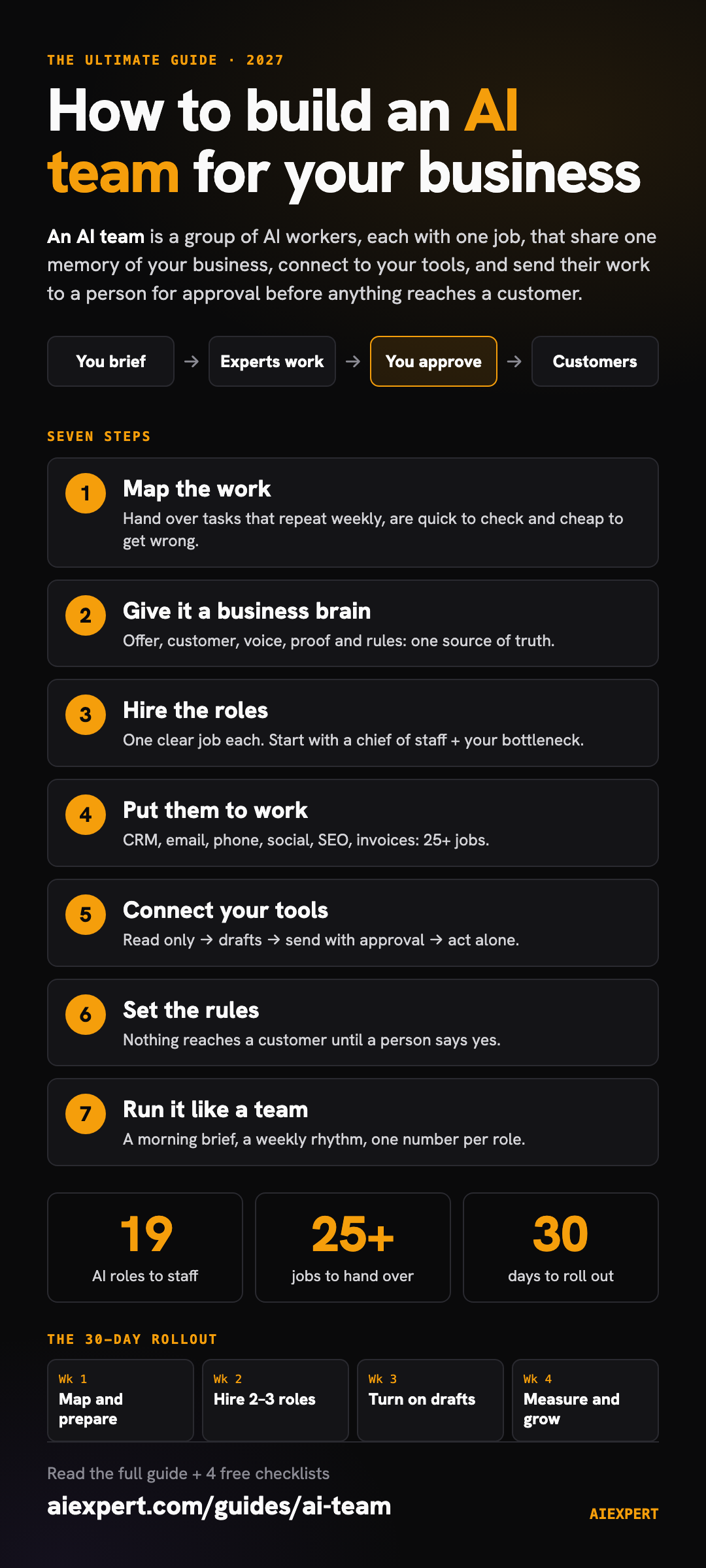
Free to use on your site, in a newsletter or a deck, with a link back to this guide. Copy the code:
Frequently asked questions
What is an AI team? An AI team is a group of AI workers, each with a defined job, that share one memory of your business, connect to your tools, and send their work to you for approval before anything goes out.
Will an AI team replace my employees? For most small businesses, no. It takes over repeatable work like drafting, research and follow-ups, so you and your people spend time on clients, sales calls and decisions.
Do I need to know how to code? No. If you can write a clear brief for a freelancer, you can brief an AI worker. Platforms handle the connections and scheduling for you.
How long does it take to set up? On a platform, your first two or three roles can be working within a day. Expect about 30 days to reach a steady weekly rhythm you trust.
Is it safe to connect my email and CRM? It is when you start read-only, move to drafts, and require approval for anything that sends, posts or charges. Never give AI your passwords or bank details directly.
Which roles should I hire first? A chief of staff to tie the team together, then whichever role clears your biggest bottleneck: usually sales follow-ups or content.
How do I know it's working? Track hours saved and one number per role each week: replies sent, posts published, leads followed up, invoices collected.
How much does an AI team cost? A DIY stack of AI subscriptions and automation tools costs about $40 to $200 a month. An all-in-one platform such as AiExpert Pro costs $29 a month. Both are far below the cost of hiring for the same hours.
Can AI set up my CRM? Yes. An AI CRM agent can import contacts from email, spreadsheets and your store, remove duplicates, research each company and build a deals pipeline. You review the result before anyone is contacted.
Can AI send emails for me? AI can write, personalise and schedule emails, newsletters and follow-up sequences. A safe setup keeps every send in an approval queue, so a person approves each campaign before it goes out.
What's the difference between an AI agent and an AI team? An AI agent is one AI worker that can plan and use tools to finish a task. An AI team is several agents with separate jobs that share one memory of your business and report to a human.
Can an AI team help my business show up in ChatGPT and AI search? Yes. An AI SEO agent can find the questions your customers ask, write clear answers that AI engines can quote, and fix the technical issues that stop your site being read.
Is an AI team worth it for a solo business? Usually yes, because a solo owner has the least spare time. Start with a chief of staff and one role, such as email or content, and add more only when the first ones are saving you time.
What's next: build yours
The businesses that win in 2027 won't be the ones with the biggest teams. They'll be the ones where one owner, backed by a well-run AI team, moves like a company of ten.
Pick the next step that fits where you are:
- See what your AI team would fix first. Run a free website audit: Lens reads your homepage and ranks what's costing you customers.
- Planning a launch? Score yourself on the free Product Launch Checklist.
- Want it done in days? The Product Launch System ($47) drafts your whole launch from 27 questions and includes your first month of Pro.
- Ready for the full team? Meet all 19 Experts and compare plans.
Keep learning: AI glossary · Task library · Help centre · AI skills · Solutions by industry
Written by Gaurav Gurbaxani, founder of AiExpert, who runs AiExpert's own marketing, sales and support with the same AI team described in this guide.

Gaurav Gurbaxani, Founder of AiExpert
Gaurav Gurbaxani has spent 17+ years helping people put businesses online. He started his agency in 2009, writes for Entrepreneur, and built aiexpert.com, which he runs on the same AI team this guide describes.
Entrepreneur · LinkedIn · First published 28 November 2026 · Last updated 28 November 2026
Cite this guide
Gurbaxani, G. (2026). The Ultimate Guide to Building an AI Team in 2027. AiExpert. https://www.aiexpert.com/guides/ai-team